Install Libreboot on ASUS KCMA-D8
| Specifications | |
|---|---|
| Manufacturer | ASUS |
| Name | KCMA-D8 |
| Released | 2011 |
| Chipset | AMD RD870S-SB700S |
| CPU | 2x Socket C32; Opteron 4200/4300 |
| Graphics | ASPEED AST2050 |
| Memory (max/cpu) | 32GB DDR3 SODIMMs (4x8 GB) ECC |
| Architecture | x86-64-v1 |
| Original boot firmware | AMI BIOS |
| Intel ME/AMD PSP | None |
| Flash chip | DIP-8 512KiB |
W+: Works without vendor firmware;
N: Doesn't work;
W*: Works with vendor firmware;
U: Untested;
P+: Partially works;
P*: Partially works with vendor firmware
?: UNKNOWN AT THIS TIME| Features | |
|---|---|
| Internal flashing with original boot firmware | N |
| Display (No 3D accel.) | W+ |
| Audio | N |
| RAM Init | W+ |
Get the ROM image
Download from release
Build from source
./mk -b coreboot asus_kcma_d8_2mbReplacable and upgradeble flash chip sizes possible, if done, adjust the 2mb (max 16mb) to it
Internal/Software Flashing
Default Libreboot firmwares updatable.
External/Hardware Flashing
The default ASUS firmware write-protects the flash, so you have to remove the chip and re-flash it using external hardware.
It has a 25XX NOR flash (SPI protocol) in a P-DIP 8 socket, which looks like this:
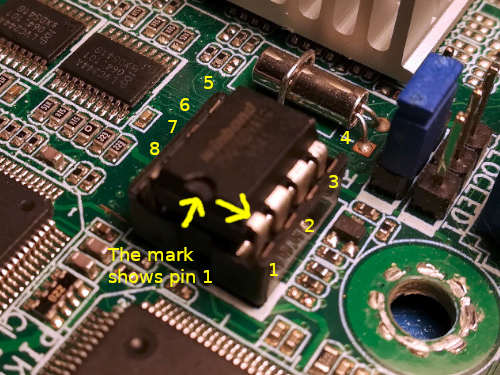
The default chip is a 2MiB one, but we recommend upgrading it to a 16MiB chip.
The basic guide is not enough for this board, read the full guide as well.
Note that not all boards are compatible. See board status below to determine compatibility with your board.
Device Unique Properties
Physically backup up vendor firmware
Dumping the factory bios, then hot-swapping the flash to keep to flash libreboot on it, and keep the original too.
Board status
There are two ways to identify a supported KCMA-D8 board:
- Serial number (sticker attached to the 24-pin ATX power connector)
- BIOS version (sticker next to CPU slot 1, last four digits)
Supported boards begin with a serial number of B9S2xxxxxxxx or above where the first character refers to the year of manufacture (A = 2010, B = 2011, etc.) and the following character the month in hexadecimal (1…9, A, B, C). Thus, any board produced September 2011 or later are compatible with libreboot. Boards originally shipped with BIOS version 2001 or higher are also compatible.
For help locating these identifying markers, see ASUS documentation for determining Opteron 4200 series compatibility
For more detailed information regarding the coreboot port, see https://raptorengineeringinc.com/coreboot/kcma-d8-status.php
Form factor
This board is ATX form factor. While the ATX standard, version 2.2 specifies board dimensions 305mm x 244mm, this board measures 305mm x 253mm; please ensure that your case supports this extra ~cm in width.
IPMI iKVM module add-on
IPMI iKVM module (optional add-on card) uses proprietary firmware. Since it’s for remote out-of-band management, it’s theoretically a backdoor similar to the Intel Management Engine. Fortunately, unlike the ME, this firmware is unsigned which means that a free replacement is theoretically possible. For now, the libreboot project recommends not installing the module. This project might be interesting to derive from, for those who want to work on a free replacement. In practice, out-of-band management isn’t very useful anyway (or at the very least, it’s not a major inconvenience to not have it).
Flash chips
2MiB flash chips are included by default, on these boards. It’s on a P-DIP 8 slot (SPI chip). The flash chip can be upgraded to higher sizes: 4MiB, 8MiB or 16MiB. With at least 8MiB, you could feasibly fit a compressed linux+initramfs image (BusyBox+Linux system) into CBFS and boot that, loading it into memory (and nowadays there is LinuxBoot, for which we would recommend a 16MiB boot flash)
DO NOT hot-swap the chip with your bare hands. Use a P-DIP 8 chip extractor. These can be found online. See http://www.coreboot.org/Developer_Manual/Tools#Chip_removal_tools
Ideally, you should not hot-swap. Only remove the IC when the system is powered down and disconnected from mains.
Graphics
Text-mode works with ast2050. See #graphics
Issues/Untested
- Opteron 4100 series CPUs are currently incompatible (outdated, might work)
- LRDIMM memory modules are currently incompatible (use UDIMMs please) - NOTE: might actually work nowadays.
- Memory initialization is still problematic for some modules. We recommend avoiding Kingston and Super Talent modules for this reason. The coreboot wiki has some information about RAM compatibility. The wiki is deprecated but the info on it is still correct for this board. (outdated, might work)
- SAS (via PIKE 2008 module) requires non-free option ROM (and SeaBIOS) to boot from it (theoretically possible to replace, but you can put a kernel in CBFS or on SATA and boot from that, which can be on a SAS drive. The linux kernel can use those SAS drives (via PIKE module) without an option ROM). NOTE: SeaBIOS can load PCI-E option ROMs, and by default it will do so inlibreboot, so you could use it. However, you could also simplyinstall 16MiB NOR flash with linuxboot payload in it, and use linuxboot which has the Linux kernel, which can use SAS drives without needing that option ROM; then it can kexec another linux kernel, which in turn also can can use those drives. Or just put a standard linux kernel and initramfs in cbfs and chainload that from GRUB, with the right parameters.
Expanded_Specifications
The Canoeboot version of this page is: https://canoeboot.org/docs/install/kcma-d8.html
Markdown file for this page: https://libreboot.org/docs/install/kcma-d8.md
This HTML page was generated by the Libreboot Static Site Generator.