---
title: Thunderbolt bug fix on Lenovo ThinkPad T480, T480s, T580, X280
x-toc-enable: true
...
**[!!BACKUP everything!!](https://libreboot.org/docs/install/#howto-readwriteerase-the-boot-flash) just in case something fails.**
### Thunderbolt Issue (applies to t580/t480/t480s/x280)
The thunderbolt firmware on launch units had a bug where certain debug
info is written on certain events, such as plugging in a charger to the USB-C
connector. Log data is stored in the Thunderbolt firmware's own SPI flash,
which is separate from the main SPI flash containing the system firmware
e.g. coreboot.
This photo shows that flash chip on a ThinkPad T480:
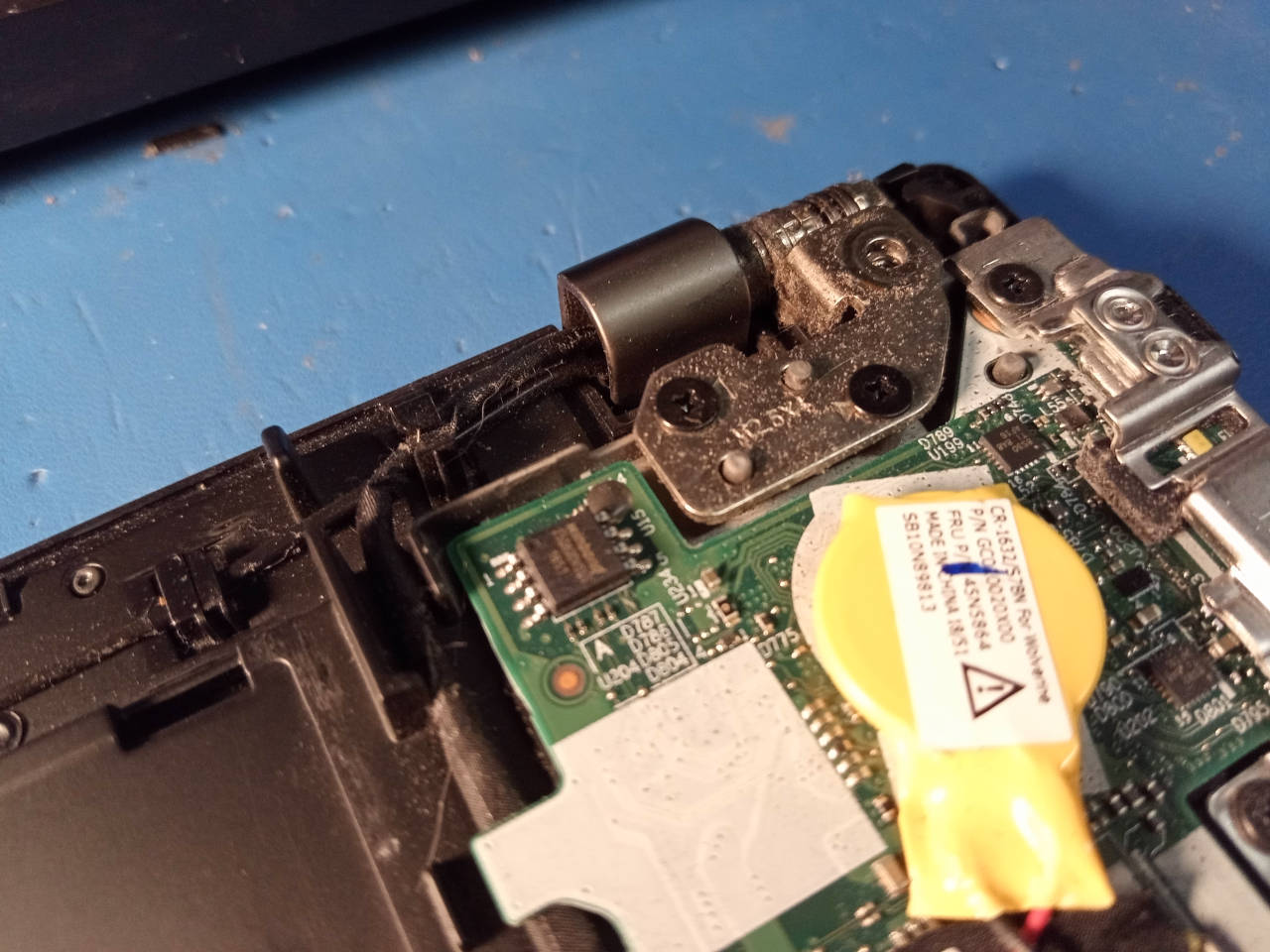 **TODO: show photo for T580 as well**. NOTE: the flashes are in similar locations
on the T580. The ThunderBolt flash is smaller; same pin pitch, but not as wide,
so attaching the clip will be a lot more delicate than on T480, but it does work.
It's also present on the T480S (S model), but in a different location; on
the S model, the main system flash is still located somewhere near the
centre of the board, and the ThunderBolt flash near the edge of the board, as
it is on the T480, but the T480/T480s use slightly different wiring and they
have a slightly different board layout.
What is the problem?
If that flash gets full, thunderbolt PCI-E stops working and fast charging
stops working, but slow charging still works. The issue can be prevented by
updating the firmware. See:
If you're already affected by the bug, you can restore it to a working state
by flashing the Thunderbolt firmware externally. You *cannot* fix the issue
with Lenovo's software-based flasher, if the issue is already present, so
you *must* flash externally in that case; you can also flash externally, even
if the issue is not yet present.
### External flashing
You will flash the ThunderBolt firmware externally. It is on a SOIC8 25xx NOR
flash, similar to the one where coreboot is flashed, and located nearby.
Use the [25XX NOR flashing guide](spi.md) if you need to flash this chip. It's
the same guide that you will use for the main system flash, which is a separate
flash IC.
### Download ThunderBolt firmware
The firmware can be extracted from Lenovo's updater, specifically the `.exe`
file. For your convenience, lbmk (Libreboot's build system) can download this
for you. Run the following commands in lbmk:
(please install [build dependencies](../build/) first)
Commands:
./mk -d coreboot lenovo_thinkpad_t480s_16mb_uefi
./mk -d coreboot lenovo_thinkpad_t480_16mb_uefi
You will find the files at these locations in lbmk:
* `vendorfiles/t480/tb.bin`
* `vendorfiles/t480s/tb.bin`
These have already been padded, to the correct size of 1MB, whereas the original
size (within the `.exe` file) was 256KB.
These files are *also* generated, if you used the `./mk inject` command,
on a pre-compiled release image, as documented [here](ivy_has_common.md).
### Flash the ThunderBolt firmware
**PLEASE PICK THE RIGHT FIRMWARE** - for example:
* `vendorfiles/t480/tb.bin`
* `vendorfiles/t480s/tb.bin`
* `vendorfiles/t580/tb.bin`
* `vendorfiles/x280/tb.bin`
You *must* pick the right one for your board.
**WARNING: DO NOT FLASH IT FIRST; YOU MUST PERFORM SOME PRE-REQUISITE STEPS
FIRST, BEFORE FLASHING `tb.bin`**:
**Firstly, please note that this procedure has *only* been tested with Lenovo's
UEFI firmware installed on the main flash. Please ensure that you have also
switched Lenovo UEFI/EC firmware to the specific version referenced on this
page, for your board.** - for the rest of this, we will assume that you've not
yet flashed Libreboot, though there's no reason in principle why this can't
also work *after* you've flashed Libreboot; it's just that we only tested it
from Lenovo UEFI firmware.
Now, *remove* the CR2032 battery (yellow coin-cell battery). Please also ensure
that you've disabled *ThunderBolt Assist* in the Lenovo UEFI setup menu. You
should also disable the internal battery, on T480 specifically (T480s only has
an internal battery). You should do this with no batteries connected anyway.
Firstly, make *two dumps* of the flash, using [flashprog](spi.md) - and the
linked guide generally tells you how to dump/flash the chip. Make sure both
dumps have the same checksum, using e.g. `sha512sum`.
Now, *erase* the flash. This example command is when using a Raspberry Pi Pico,
assuming that the device shows up as `/dev/ttyACM0` - please adapt accordingly
to whatever programmer you have:
flashprog -p serprog:dev=/dev/ttyACM0 -E
Note that the `-E` argument is what specifies that the chip should be *erased*.
Now, you must create a file called `null.bin`, which contains all zeroes:
dd if=/dev/zero of=null.bin bs=1M count=1
Please ensure (in hexdump) that the file does contain all zeroes, and that it
is 1MB in size. You will now flash it, again adapting the command below to
whatever programmer you have:
flashprog -p serprog:dev=/dev/ttyACM0 -w null.bin
**NOW, REMOVE the clip. Button it back up and turn the T480 on, with both
the battery and the charger connected, plugging in the battery first.**
It *should* boot up and show the Lenovo boot screen. Give it a few moments.
When you've confirmed that it has booted the Lenovo firmware, *shut down* the
machine and remove the battery / power supply again. It *may take a while* to
boot Lenovo's firmware when doing this, so please be very patient.
After you've confirmed that the machine boots, I say again: make sure to shut
it down fully, removing all batteries and power supplies.
It is at this moment that you will externally flash the `tb.bin` file. Please
make sure to flash the correct one for your board:
* T480: `vendorfiles/t480/tb.bin`
* T480s: `vendorfiles/t480s/tb.bin`
* T580: `vendorfiles/t580/tb.bin`
### Manual TBT.bin extraction (optional)
If you already used the `./mk -d` commands above, to grab `tb.bin`, then you
can skip this section.
Libreboot's automated build system has a lot more dependencies. If you want to
avoid installing them, and extract the file manually, you can. Simply download
the `.exe` file and do this:
innoextract filename.exe
The `innoextract` utility will probably be available in your distro's package
manager. You can otherwise find it here:\
- credit goes to Daniel Scharrer for
writing this excellent software.
A directory will be created with the extracted files. Inside it, you will
find a file named `TBT.bin`. You can pad it like so:
dd if=/dev/null of=TBT.bin bs=1 seek=1048576
Note that the `seek` variable here matching 1MB flash size. If you encounter
a different flash size, adapt accordingly (the same applies when creating
the `null.bin` file). Libreboot's build system makes this size configurable
per board, on the theory that we may encounter other flash sizes in the future,
when we add more ThinkPads of this generation to Libreboot.
### Continue flashing ThunderBolt firmware
Ok, so you have the file. Now you can flash it.
Example:
flashprog -p serprog:dev=/dev/ttyACM0 -w tb.bin
Adapt `tb.bin` in the command above, to the actual one that you wish to flash.
You *MUST* do it in the exact order as prescribed above. After flashing
the `tb.bin` image, un-clip and simply re-assemble. After you boot up, it should
once again show the boot screen, and USB-C / ThunderBolt will work perfectly.
You can repeat the above steps to restore the old firmware version. This is why
you were instructed to make a backup, on the off-chance that you may wish to do
so for some reason in the future.
### ThunderBolt troubleshooting
If you accidentally flashed an incorrect firmware image, or you didn't properly
erase and boot first before flashing the new image, you can simply repeat the
steps again; on erase/null, you then boot up and *wait* and it'll eventually
show the boot screen again. If it doesn't work, just keep doing it until it does.
Credits go
to [Adam McNutt](https://gitlab.com/MobileAZN/lenovo-t480-thunderbolt-firmware-fixes)
who originally provided such instructions, for the ThinkPad T480. The information
there was adapted for *this* guide, in the Libreboot documentation. Libreboot
may very well support other ThinkPads from the same generation, in a future
release after Libreboot 20241206, and many of those have this same issue; when
it does, Libreboot will document this fix for those machines too, and probably
move these instructions to a dedicated page on the website.
[//]: # "SPDX-License-Identifier: GFDL-1.3-or-later"
**TODO: show photo for T580 as well**. NOTE: the flashes are in similar locations
on the T580. The ThunderBolt flash is smaller; same pin pitch, but not as wide,
so attaching the clip will be a lot more delicate than on T480, but it does work.
It's also present on the T480S (S model), but in a different location; on
the S model, the main system flash is still located somewhere near the
centre of the board, and the ThunderBolt flash near the edge of the board, as
it is on the T480, but the T480/T480s use slightly different wiring and they
have a slightly different board layout.
What is the problem?
If that flash gets full, thunderbolt PCI-E stops working and fast charging
stops working, but slow charging still works. The issue can be prevented by
updating the firmware. See:
If you're already affected by the bug, you can restore it to a working state
by flashing the Thunderbolt firmware externally. You *cannot* fix the issue
with Lenovo's software-based flasher, if the issue is already present, so
you *must* flash externally in that case; you can also flash externally, even
if the issue is not yet present.
### External flashing
You will flash the ThunderBolt firmware externally. It is on a SOIC8 25xx NOR
flash, similar to the one where coreboot is flashed, and located nearby.
Use the [25XX NOR flashing guide](spi.md) if you need to flash this chip. It's
the same guide that you will use for the main system flash, which is a separate
flash IC.
### Download ThunderBolt firmware
The firmware can be extracted from Lenovo's updater, specifically the `.exe`
file. For your convenience, lbmk (Libreboot's build system) can download this
for you. Run the following commands in lbmk:
(please install [build dependencies](../build/) first)
Commands:
./mk -d coreboot lenovo_thinkpad_t480s_16mb_uefi
./mk -d coreboot lenovo_thinkpad_t480_16mb_uefi
You will find the files at these locations in lbmk:
* `vendorfiles/t480/tb.bin`
* `vendorfiles/t480s/tb.bin`
These have already been padded, to the correct size of 1MB, whereas the original
size (within the `.exe` file) was 256KB.
These files are *also* generated, if you used the `./mk inject` command,
on a pre-compiled release image, as documented [here](ivy_has_common.md).
### Flash the ThunderBolt firmware
**PLEASE PICK THE RIGHT FIRMWARE** - for example:
* `vendorfiles/t480/tb.bin`
* `vendorfiles/t480s/tb.bin`
* `vendorfiles/t580/tb.bin`
* `vendorfiles/x280/tb.bin`
You *must* pick the right one for your board.
**WARNING: DO NOT FLASH IT FIRST; YOU MUST PERFORM SOME PRE-REQUISITE STEPS
FIRST, BEFORE FLASHING `tb.bin`**:
**Firstly, please note that this procedure has *only* been tested with Lenovo's
UEFI firmware installed on the main flash. Please ensure that you have also
switched Lenovo UEFI/EC firmware to the specific version referenced on this
page, for your board.** - for the rest of this, we will assume that you've not
yet flashed Libreboot, though there's no reason in principle why this can't
also work *after* you've flashed Libreboot; it's just that we only tested it
from Lenovo UEFI firmware.
Now, *remove* the CR2032 battery (yellow coin-cell battery). Please also ensure
that you've disabled *ThunderBolt Assist* in the Lenovo UEFI setup menu. You
should also disable the internal battery, on T480 specifically (T480s only has
an internal battery). You should do this with no batteries connected anyway.
Firstly, make *two dumps* of the flash, using [flashprog](spi.md) - and the
linked guide generally tells you how to dump/flash the chip. Make sure both
dumps have the same checksum, using e.g. `sha512sum`.
Now, *erase* the flash. This example command is when using a Raspberry Pi Pico,
assuming that the device shows up as `/dev/ttyACM0` - please adapt accordingly
to whatever programmer you have:
flashprog -p serprog:dev=/dev/ttyACM0 -E
Note that the `-E` argument is what specifies that the chip should be *erased*.
Now, you must create a file called `null.bin`, which contains all zeroes:
dd if=/dev/zero of=null.bin bs=1M count=1
Please ensure (in hexdump) that the file does contain all zeroes, and that it
is 1MB in size. You will now flash it, again adapting the command below to
whatever programmer you have:
flashprog -p serprog:dev=/dev/ttyACM0 -w null.bin
**NOW, REMOVE the clip. Button it back up and turn the T480 on, with both
the battery and the charger connected, plugging in the battery first.**
It *should* boot up and show the Lenovo boot screen. Give it a few moments.
When you've confirmed that it has booted the Lenovo firmware, *shut down* the
machine and remove the battery / power supply again. It *may take a while* to
boot Lenovo's firmware when doing this, so please be very patient.
After you've confirmed that the machine boots, I say again: make sure to shut
it down fully, removing all batteries and power supplies.
It is at this moment that you will externally flash the `tb.bin` file. Please
make sure to flash the correct one for your board:
* T480: `vendorfiles/t480/tb.bin`
* T480s: `vendorfiles/t480s/tb.bin`
* T580: `vendorfiles/t580/tb.bin`
### Manual TBT.bin extraction (optional)
If you already used the `./mk -d` commands above, to grab `tb.bin`, then you
can skip this section.
Libreboot's automated build system has a lot more dependencies. If you want to
avoid installing them, and extract the file manually, you can. Simply download
the `.exe` file and do this:
innoextract filename.exe
The `innoextract` utility will probably be available in your distro's package
manager. You can otherwise find it here:\
- credit goes to Daniel Scharrer for
writing this excellent software.
A directory will be created with the extracted files. Inside it, you will
find a file named `TBT.bin`. You can pad it like so:
dd if=/dev/null of=TBT.bin bs=1 seek=1048576
Note that the `seek` variable here matching 1MB flash size. If you encounter
a different flash size, adapt accordingly (the same applies when creating
the `null.bin` file). Libreboot's build system makes this size configurable
per board, on the theory that we may encounter other flash sizes in the future,
when we add more ThinkPads of this generation to Libreboot.
### Continue flashing ThunderBolt firmware
Ok, so you have the file. Now you can flash it.
Example:
flashprog -p serprog:dev=/dev/ttyACM0 -w tb.bin
Adapt `tb.bin` in the command above, to the actual one that you wish to flash.
You *MUST* do it in the exact order as prescribed above. After flashing
the `tb.bin` image, un-clip and simply re-assemble. After you boot up, it should
once again show the boot screen, and USB-C / ThunderBolt will work perfectly.
You can repeat the above steps to restore the old firmware version. This is why
you were instructed to make a backup, on the off-chance that you may wish to do
so for some reason in the future.
### ThunderBolt troubleshooting
If you accidentally flashed an incorrect firmware image, or you didn't properly
erase and boot first before flashing the new image, you can simply repeat the
steps again; on erase/null, you then boot up and *wait* and it'll eventually
show the boot screen again. If it doesn't work, just keep doing it until it does.
Credits go
to [Adam McNutt](https://gitlab.com/MobileAZN/lenovo-t480-thunderbolt-firmware-fixes)
who originally provided such instructions, for the ThinkPad T480. The information
there was adapted for *this* guide, in the Libreboot documentation. Libreboot
may very well support other ThinkPads from the same generation, in a future
release after Libreboot 20241206, and many of those have this same issue; when
it does, Libreboot will document this fix for those machines too, and probably
move these instructions to a dedicated page on the website.
[//]: # "SPDX-License-Identifier: GFDL-1.3-or-later"