---
title: Install Libreboot on Lenovo ThinkPad T480, T480s, T580
x-toc-enable: true
...

Libreboot supports both the T480 and T480s variants. It is available in
the *Libreboot 20241206* release or later.

**T580 support was added in the Libreboot 26.01 release.**

**[PLEASE READ THESE INSTRUCTIONS BEFORE INSTALLING](ivy_has_common.md), OR
YOU MAY BRICK YOUR MACHINE!! - Please click the link and follow the instructions
there, before flashing. For posterity,
[here is the link again](ivy_has_common.md).**

<div class="specs">
<center>
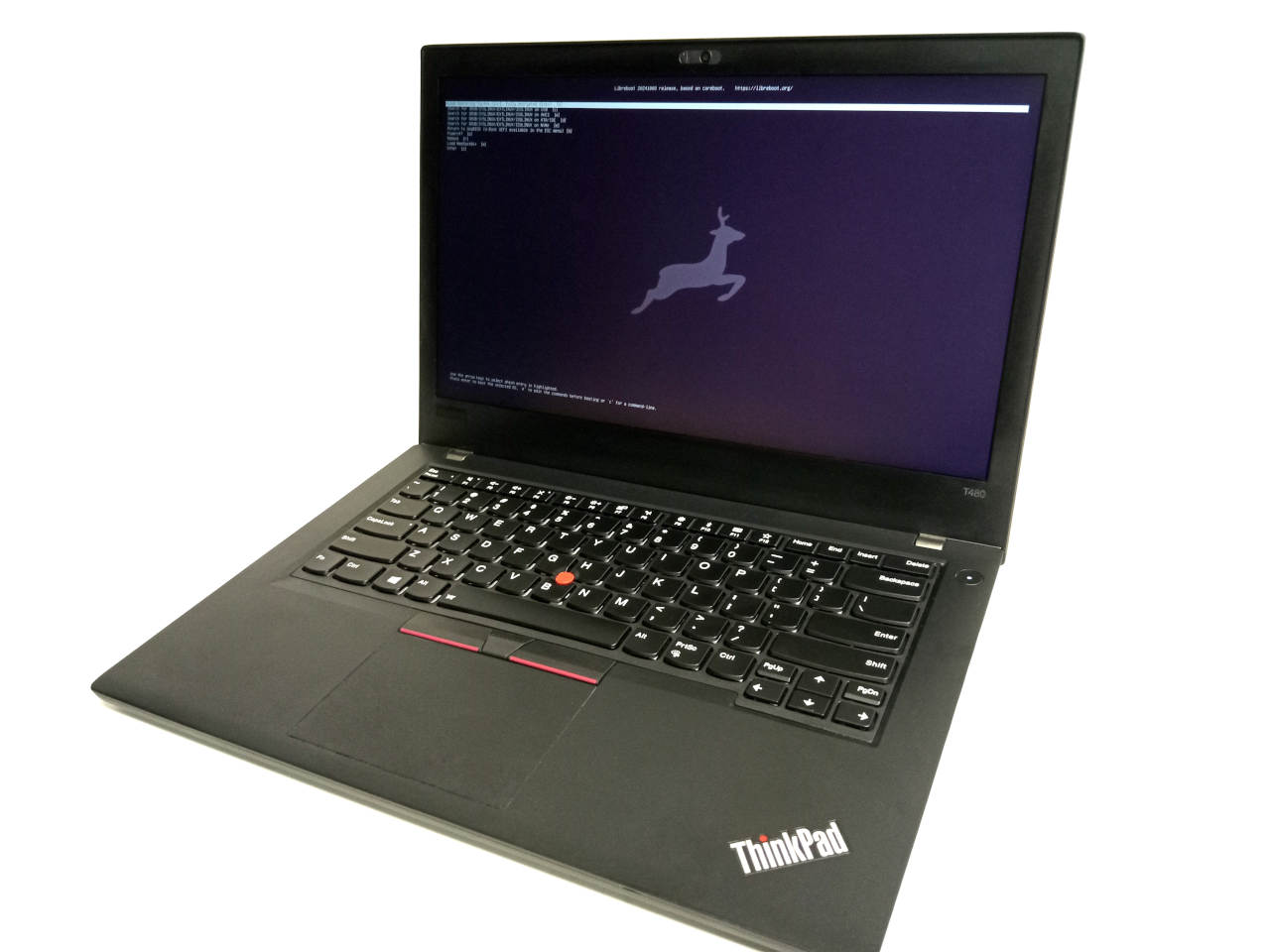
<img tabindex=1 alt="Lenovo ThinkPad T480 with Libreboot pre-installed" class="p" src="https://av.libreboot.org/t480/t480.jpg" /><span class="f"><img src="https://av.libreboot.org/t480/t480.jpg" /></span>
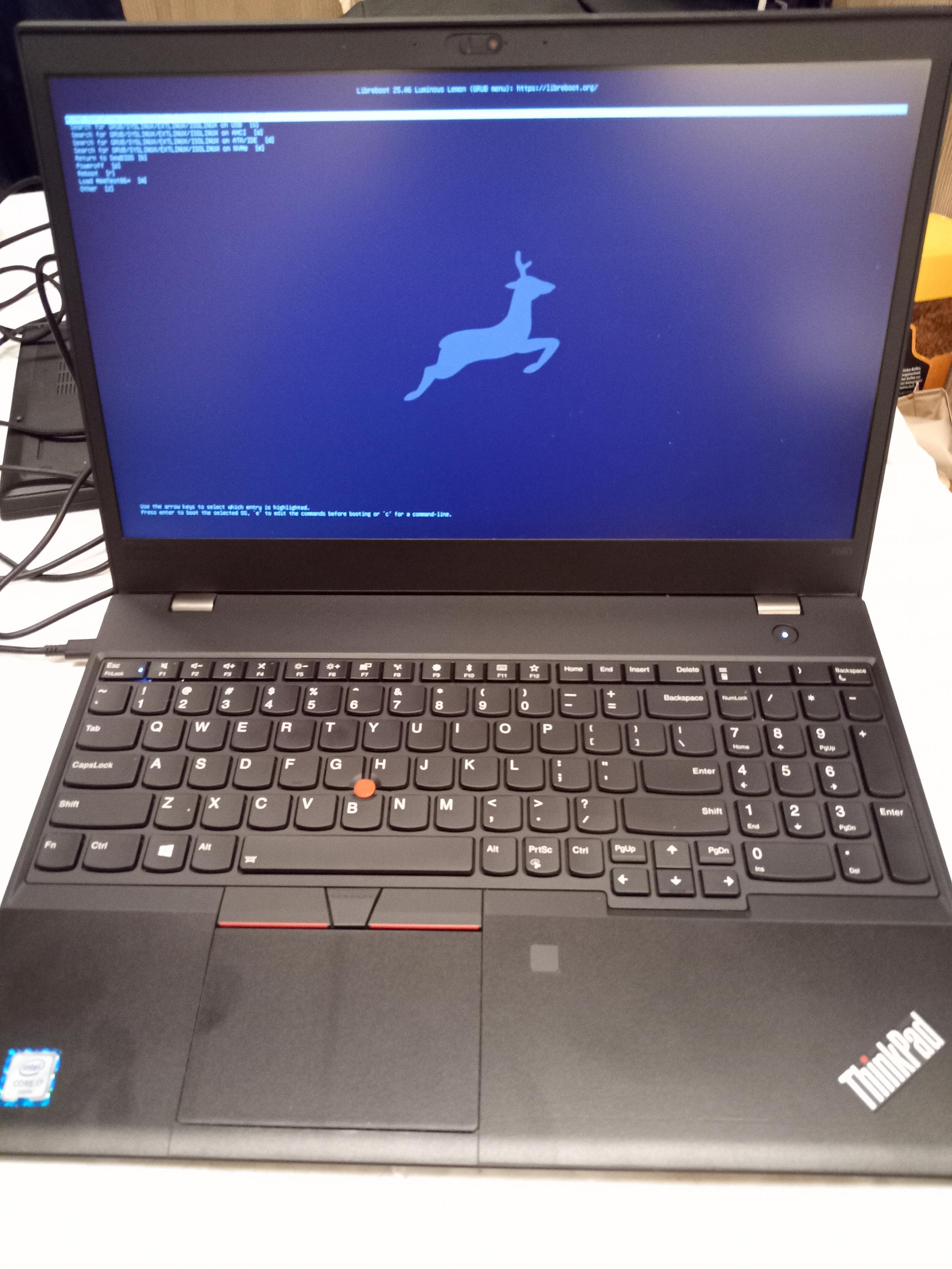
<img tabindex=1 alt="Lenovo ThinkPad T580 with Libreboot pre-installed" class="p" src="https://av.minifree.org/t580.jpg" /><span class="f"><img src="https://av.minifree.org/t580.jpg" /></span>
</center>

| ***Specifications***       |                                                |
|----------------------------|------------------------------------------------|
| **Manufacturer**           | Lenovo                                         |
| **Name**                   | ThinkPad T480, T580                                  |
| **Variants**               | ThinkPad T480, ThinkPad T480s                  |
| **Released**               | 2018                                           |
| **Chipset**                | Intel Kaby Lake Refresh                        |
| **CPU**                    | Intel Kaby Lake Refresh                        |
| **Graphics**               | Intel or Intel+Nvidia                          |
| **Memory**                 | DDR4 DIMMs; max 40GB (T480s), 64GB(T480)       |
| **Architecture**           | x86\_64                                        |
| **Original boot firmware** | Lenovo UEFI firmware                           |
| **Intel ME/AMD PSP**       | Present. Can be disabled with me\_cleaner.     |
| **Intel Boot Guard**       | [Pwned](deguard.md). Disabled using the deguard utility.|
| **Flash chip**             | SOIC-8 16MB/128Mbit system firmware            |


```
W+: Works without vendor firmware; 
N: Doesn't work; 
W*: Works with vendor firmware; 
U: Untested; 
P+: Partially works; 
P*: Partially works with vendor firmware
?: UNKNOWN AT THIS TIME
```

| ***Features***                                    |    |
|---------------------------------------------------|----|
| **Internal flashing with original boot firmware** | N  | 
| **Display (if Intel GPU)**                        | W+ |
| **Display (discrete GPU, SeaBIOS payload only)**  | N  |
| **Audio**                                         | W+ |
| **RAM Init**                                      | W* |

| ***Payloads supported***   |           |
|----------------------------|-----------|
| **GRUB (libgfxinit only)** | Works     |
| **SeaBIOS**                | Works     |
| **SeaBIOS with GRUB**      | Works     |
</div>

Open source BIOS/UEFI firmware
------------------------------

This document will teach you how to install Libreboot, on your
Lenovo ThinkPad T480 and/or T480s laptop motherboard.
Libreboot is a [Free Software](https://writefreesoftware.org/learn) project
that replaces proprietary BIOS/UEFI firmware.

Buy pre-installed
-----------------

**ThinkPad T480/T480S is available to purchase with Libreboot pre-installed. See:
<https://minifree.org/product/libreboot-t480.html>**

The larger T580 is also available: 
<https://minifree.org/product/libreboot-t580.html>

ThinkPad T480/T480s information
-------------------------

Regarding memory: T480s (S model) has 8GB onboard RAM, and an available DIMM
slot on which an additional 32GB SODIMM can be installed. The regular T480
has two DIMM slots, allowing 2x32GB DDR4 SODIMMs.

Thanks go to *Mate Kukri* who implemented both of these excellent coreboot
ports; he is also the author of the deguard utility, which is used to disable
the Intel Boot Guard on these machines; disabling the Boot Guard was necessary
in order to get coreboot working!

Official information about the T480 can be found here:\
<https://psref.lenovo.com/syspool/Sys/PDF/ThinkPad/ThinkPad_T480/ThinkPad_T480_Spec.PDF>

...and information about the T480s can be found here:\
<https://psref.lenovo.com/syspool/Sys/PDF/ThinkPad/ThinkPad_T480s/ThinkPad_T480s_Spec.pdf>

This port is implemented in Libreboot by merging Mate Kukri's T480/T480s
patchset. See: <https://review.coreboot.org/c/coreboot/+/83274> - as of 6
January 2025, Libreboot's code matches that of patchset 25.

Preparing a release Rom
-----------------------

**Please follow this prior to flashing, or you may brick your machine.**

Please [inject vendor files](ivy_has_common.md) prior to flashing. You can also
use this guide to change the built-in MAC address for your Intel Gigabit
Ethernet device; doing so is advisable, because otherwise you will have a
default, generic MAC address.

### Absolutely unsigned Intel ME!

Libreboot already disables the Intel ME by default, using `me_cleaner`, but
the T480/T480s specifically have an additional quirk:

One of the benefits of [deguard](deguard.md) for Intel MEv11 is that it sets
the ME in such a state where you can run unsigned code in there. This is how
the Intel Boot Guard was disabled, because it is the ME that enforces such
restrictions; more information about deguard is available on a dedicated page.

The deguard utility could also be used to enable the red-unlock hack, which
would permit unsigned execution of new CPU microcode, though much more
research is needed. Because of these two facts, this makes the T480/T480s the
most freedom-feasible of all relatively modern x86 laptops.

With deguard, you have complete control of the flash. This is unprecedented on
recent Intel systems in Libreboot, so it's certainly a very interesting port!

Libreboot uses both `me_cleaner` *and* `deguard` on the T480/T480s.

### What works in this port:

Intel graphics, internal screen, ethernet, USB, WLAN, HDA verbs (e.g. headphone
jack), S3 suspend/resume, M2 NVMe SSDs and SATA, B+M key NVMe SSDs in WWAN slot,
**all works perfectly**. External video outputs and webcam also work. Microphone
works, line-out works... everything works. UART also available via line-out jack
(jumpers required on the motherboard).

There *are* a few minor exceptions as to what works; this will be covered in
other sections of this page. This port is *almost* perfect, but with some caveats.

Build images from source
------------------------

Please refer to the standard [build instructions](../build/) first.

The build target, when building from source, is thus:

	./mk -b coreboot t480_vfsp_16mb
	./mk -b coreboot t480s_vfsp_16mb

**NOTE: The T480 and T480s may be similar, but they do have several critical
differences in their wiring, so you MUST flash the correct image. Please
choose one of the above build targets accordingly.**

Installation
------------

**Please read carefully**, because *many* prerequisite steps are required
prior to Libreboot installation.

### Insert binary files (DO THIS FIRST)

**If you're using a release ROM**, please ensure that you've inserted extra firmware
required. Refer to the [guide](../install/ivy_has_common.md) for that. **(failure
to adhere to this advice will result in a BRICKED machine)**

Libreboot's build system automatically downloads and processes these files if
you build Libreboot from source, but the same logic that it uses must be re-run
if you're using a release image. This is to bypass certain restrictions on
direct distribution, for files such as the Intel Management Engine firmware.

The pre-compiled images do not contain an Intel ME, so you must first insert it
using the above guide. Libreboot's build system automatically grabs it, disables
it after boot with `me_cleaner`, and configures it with [deguard](deguard.md)
to disable the Intel Boot Guard - this automation is either applied at build
time, or you can use it on release images.

Again:

If you're [building from source](../build/) via Libreboot's build system, these
files are inserted during build. You only need to manually insert them, using
the above linked guide, on the pre-compiled release images!

### Set MAC address

This platform uses an Intel Flash Descriptor, and defines an Intel GbE NVM
region. As such, release/build ROMs will contain the same MAC address. To
change the MAC address, please read [nvmutil documentation](../install/nvmutil.md).

**NOTE: If changing the MAC address, please give `ifdtool` the following
argument when using it: `--platform sklkbl`** - otherwise, ifdtool will
handle the IFD incorrectly!

### Thunderbolt issue (READ THIS BEFORE FLASHING)

The thunderbolt firmware on launch units had a bug where certain debug
info is written on certain events, such as plugging in a charger to the USB-C
connector. Log data is stored in the Thunderbolt firmware's own SPI flash,
which is separate from the main SPI flash containing the system firmware
e.g. coreboot.

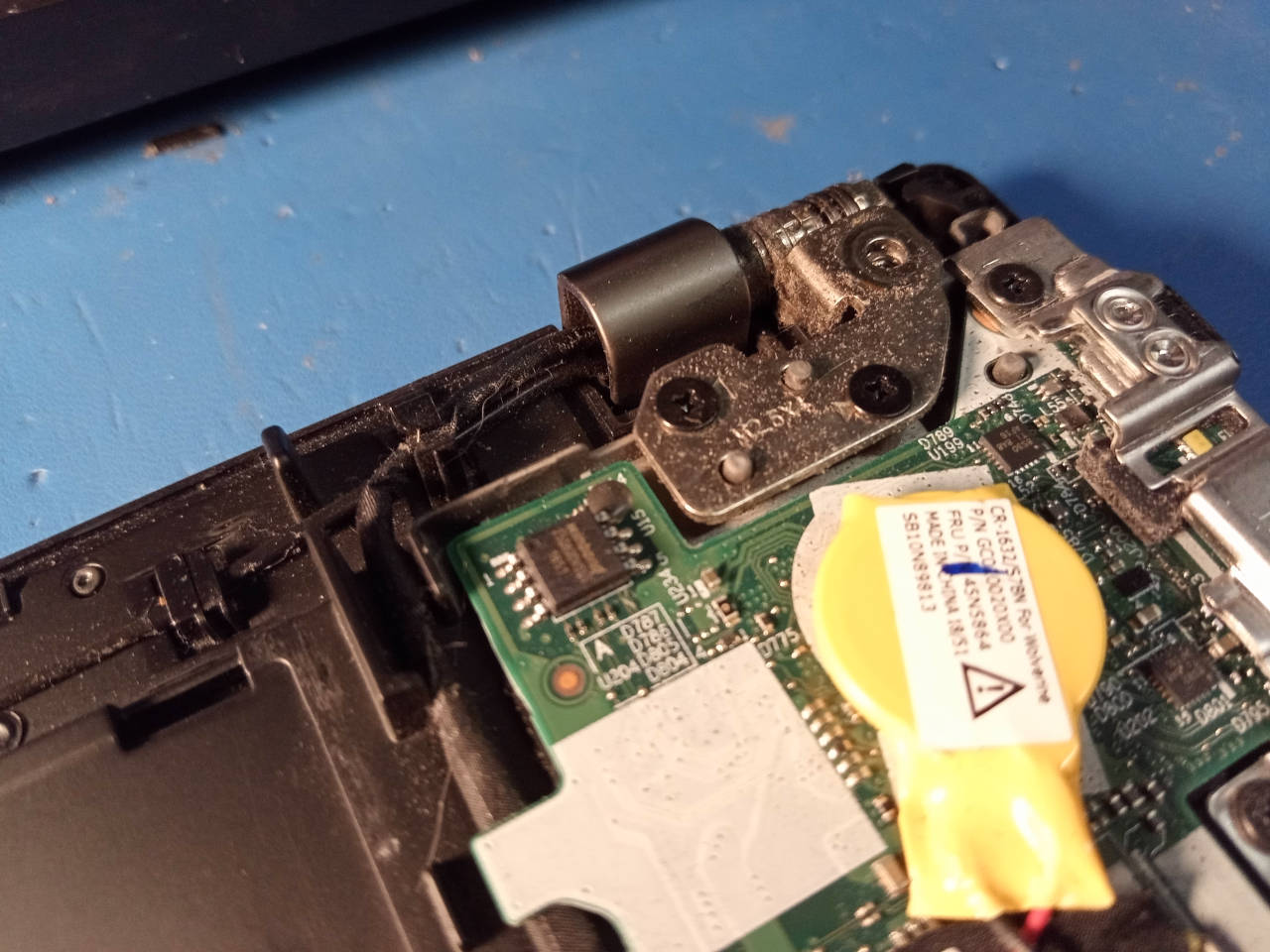
This photo shows that flash chip on a ThinkPad T480:

<img tabindex=1 alt="ThinkPad T480 NOR flash (thunderbolt firmware)" class="p" src="https://av.libreboot.org/t480/t480tbspi.jpg" /><span class="f"><img src="https://av.libreboot.org/t480/t480tbspi.jpg" /></span>

**TODO: show photo for T580 as well**. NOTE: the flashes are in similar locations
on the T580. The ThunderBolt flash is smaller; same pin pitch, but not as wide,
so attaching the clip will be a lot more delicate than on T480, but it does work.

It's also present on the T480S (S model), but in a different location; on
the S model, the main system flash is still located somewhere near the
centre of the board, and the ThunderBolt flash near the edge of the board, as
it is on the T480, but the T480/T480s use slightly different wiring and they
have a slightly different board layout.

#### What is the problem?

If that flash gets full, thunderbolt PCI-E stops working and fast charging
stops working, but slow charging still works. The issue can be prevented by
updating the firmware. See:
<https://pcsupport.lenovo.com/gb/en/products/laptops-and-netbooks/thinkpad-t-series-laptops/thinkpad-t480s-type-20l7-20l8/solutions/ht508988-critical-intel-thunderbolt-software-and-firmware-updates-thinkpad>

If you're already affected by the bug, you can restore it to a working state
by flashing the Thunderbolt firmware externally. You *cannot* fix the issue
with Lenovo's software-based flasher, if the issue is already present, so
you *must* flash externally in that case; you can also flash externally, even
if the issue is not yet present.

#### External flashing

You will flash the ThunderBolt firmware externally. It is on a SOIC8 25xx NOR
flash, similar to the one where coreboot is flashed, and located nearby.

Use the [25XX NOR flashing guide](spi.md) if you need to flash this chip. It's
the same guide that you will use for the main system flash, which is a separate
flash IC.

#### Download ThunderBolt firmware

The firmware can be extracted from Lenovo's updater, specifically the `.exe`
file. For your convenience, lbmk (Libreboot's build system) can download this
for you. Run the following commands in lbmk:

(please install [build dependencies](../build/) first)

Commands:

	./mk -d coreboot t480s_vfsp_16mb
	./mk -d coreboot t480_vfsp_16mb

You will find the files at these locations in lbmk:

* `vendorfiles/t480/tb.bin`
* `vendorfiles/t480s/tb.bin`

These have already been padded, to the correct size of 1MB, whereas the original
size (within the `.exe` file) was 256KB.

These files are *also* generated, if you used the `./mk inject` command,
on a pre-compiled release image, as documented [here](ivy_has_common.md).

#### Flash the ThunderBolt firmware

**PLEASE PICK THE RIGHT FIRMWARE** - for example:

* `vendorfiles/t480/tb.bin`
* `vendorfiles/t480s/tb.bin`
* `vendorfiles/t580/tb.bin`

You *must* pick the right one for your board.

**WARNING: DO NOT FLASH IT FIRST; YOU MUST PERFORM SOME PRE-REQUISITE STEPS
FIRST, BEFORE FLASHING `tb.bin`**:

**Firstly, please note that this procedure has *only* been tested with Lenovo's
UEFI firmware installed on the main flash. Please ensure that you have also
switched Lenovo UEFI/EC firmware to the specific version referenced on this
page, for your board.** - for the rest of this, we will assume that you've not
yet flashed Libreboot, though there's no reason in principle why this can't
also work *after* you've flashed Libreboot; it's just that we only tested it
from Lenovo UEFI firmware.

Now, *remove* the CR2032 battery (yellow coin-cell battery). Please also ensure
that you've disabled *ThunderBolt Assist* in the Lenovo UEFI setup menu. You
should also disable the internal battery, on T480 specifically (T480s only has
an internal battery). You should do this with no batteries connected anyway.

Firstly, make *two dumps* of the flash, using [flashprog](spi.md) - and the
linked guide generally tells you how to dump/flash the chip. Make sure both
dumps have the same checksum, using e.g. `sha512sum`.

Now, *erase* the flash. This example command is when using a Raspberry Pi Pico,
assuming that the device shows up as `/dev/ttyACM0` - please adapt accordingly
to whatever programmer you have:

	flashprog -p serprog:dev=/dev/ttyACM0 -E

Note that the `-E` argument is what specifies that the chip should be *erased*.

Now, you must create a file called `null.bin`, which contains all zeroes:

	dd if=/dev/zero of=null.bin bs=1M count=1

Please ensure (in hexdump) that the file does contain all zeroes, and that it
is 1MB in size. You will now flash it, again adapting the command below to
whatever programmer you have:

	flashprog -p serprog:dev=/dev/ttyACM0 -w null.bin

**NOW, REMOVE the clip. Button it back up and turn the T480 on, with both
the battery and the charger connected, plugging in the battery first.**

It *should* boot up and show the Lenovo boot screen. Give it a few moments.
When you've confirmed that it has booted the Lenovo firmware, *shut down* the
machine and remove the battery / power supply again. It *may take a while* to
boot Lenovo's firmware when doing this, so please be very patient.

After you've confirmed that the machine boots, I say again: make sure to shut
it down fully, removing all batteries and power supplies.

It is at this moment that you will externally flash the `tb.bin` file. Please
make sure to flash the correct one for your board:

* T480: `vendorfiles/t480/tb.bin`
* T480s: `vendorfiles/t480s/tb.bin`
* T580: `vendorfiles/t580/tb.bin`

#### Manual TBT.bin extraction (optional)

If you already used the `./mk -d` commands above, to grab `tb.bin`, then you
can skip this section.

Libreboot's automated build system has a lot more dependencies. If you want to
avoid installing them, and extract the file manually, you can. Simply download
the `.exe` file and do this:

	innoextract filename.exe

The `innoextract` utility will probably be available in your distro's package
manager. You can otherwise find it here:\
<https://constexpr.org/innoextract/> - credit goes to Daniel Scharrer for
writing this excellent software.

A directory will be created with the extracted files. Inside it, you will
find a file named `TBT.bin`. You can pad it like so:

	dd if=/dev/null of=TBT.bin bs=1 seek=1048576

Note that the `seek` variable here matching 1MB flash size. If you encounter
a different flash size, adapt accordingly (the same applies when creating
the `null.bin` file). Libreboot's build system makes this size configurable
per board, on the theory that we may encounter other flash sizes in the future,
when we add more ThinkPads of this generation to Libreboot.

#### Continue flashing ThunderBolt firmware

Ok, so you have the file. Now you can flash it.

Example:

	flashprog -p serprog:dev=/dev/ttyACM0 -w tb.bin

Adapt `tb.bin` in the command above, to the actual one that you wish to flash.

You *MUST* do it in the exact order as prescribed above. After flashing
the `tb.bin` image, un-clip and simply re-assemble. After you boot up, it should
once again show the boot screen, and USB-C / ThunderBolt will work perfectly.

You can repeat the above steps to restore the old firmware version. This is why
you were instructed to make a backup, on the off-chance that you may wish to do
so for some reason in the future.

#### ThunderBolt troubleshooting

If you accidentally flashed an incorrect firmware image, or you didn't properly
erase and boot first before flashing the new image, you can simply repeat the
steps again; on erase/null, you then boot up and *wait* and it'll eventually
show the boot screen again. If it doesn't work, just keep doing it until it does.

Credits go
to [Adam McNutt](https://gitlab.com/MobileAZN/lenovo-t480-thunderbolt-firmware-fixes)
who originally provided such instructions, for the ThinkPad T480. The information
there was adapted for *this* guide, in the Libreboot documentation. Libreboot
may very well support other ThinkPads from the same generation, in a future
release after Libreboot 20241206, and many of those have this same issue; when
it does, Libreboot will document this fix for those machines too, and probably
move these instructions to a dedicated page on the website.

### Flash a Libreboot ROM image (software)

If you're already running Libreboot, and you don't have flash protection
turned on, [internal flashing](../install/) is possible.

The default Libreboot setup removes all flash restrictions, allowing you to
flash internally, from a Linux or BSD systems running on the T480/T480. You must
also [disable /dev/mem protections](devmem.md) for internal flashing to work.

### Flash a ROM Libreboot image (hardware)

#### Prepare your external programmer

**First, please assimilate all knowledge in
the [25XX NOR flashing guide](spi.md) - it shows how to program these flash
chips, using a dedicated flash programmer, which is something that you will
physically connect to the flash chip.**

Again: this is only necessary if you have Lenovo BIOS, or if you enabled [flash
write protections](../linux/grub_hardening.md) on an existing Libreboot setup.

#### Update Lenovo firmware first

*Before* installing Libreboot for the first time, it is important that you
first update the Lenovo UEFI firmware and EC firmware to a *specific* version,
mentioned below.

**MAKE SURE to update the Lenovo UEFI firmware before installing Libreboot.
You must also make a dump of the NOR flash, before updating Lenovo's firmware,
and once again before flashing Libreboot, being sure you have good dumps.**

**T480: Make sure to use the `n24ur39w` release, when updating Lenovo firmware.
Or downgrade to this version. This is because the EC UART support in coreboot
specifically taps into the EC code of that release. See:\
<https://download.lenovo.com/pccbbs/mobiles/n24ur39w.html>\
and it can be downloaded here:\
<https://support.lenovo.com/us/en/downloads/ds502355-bios-update-utility-bootable-cd-for-windows-10-64-bit-linux-thinkpad-t480>\
NOTE: T480s (S model) doesn't have EC UART support yet, so it doesn't matter
yet which version you update to on the S model.**

Prep a USB stick with it:

	geteltorito -o t480_bios_update.img /path/to/your/downloaded.iso

Now DD it to the raw USB flash device:

	dd if=t480_bios_update.img of=/dev/sdX bs=4M conv=fsync status=progress

You must disable *Secure Rollback Prevention* in the BIOS, under
UEFI BIOS Update Option; please also enable *Flash BIOS Updating by
End Users*.

You must disable SecureBoot, and enable legacy/CSM boot, and boot it in BIOS
mode, not UEFI mode. Make sure your battery is well-charged, and boot it with
a battery and with the power supply plugged in. Select *option 2* in the menu,
to update your BIOS, which also updates the EC firmware. This is the Lenovo
BIOS/UEFI updater. Once you've updated, you can flash Libreboot.

Please ensure also that you've already dealt with the Thunderbolt issue, which
is described above. After all of this, you can flash Libreboot.

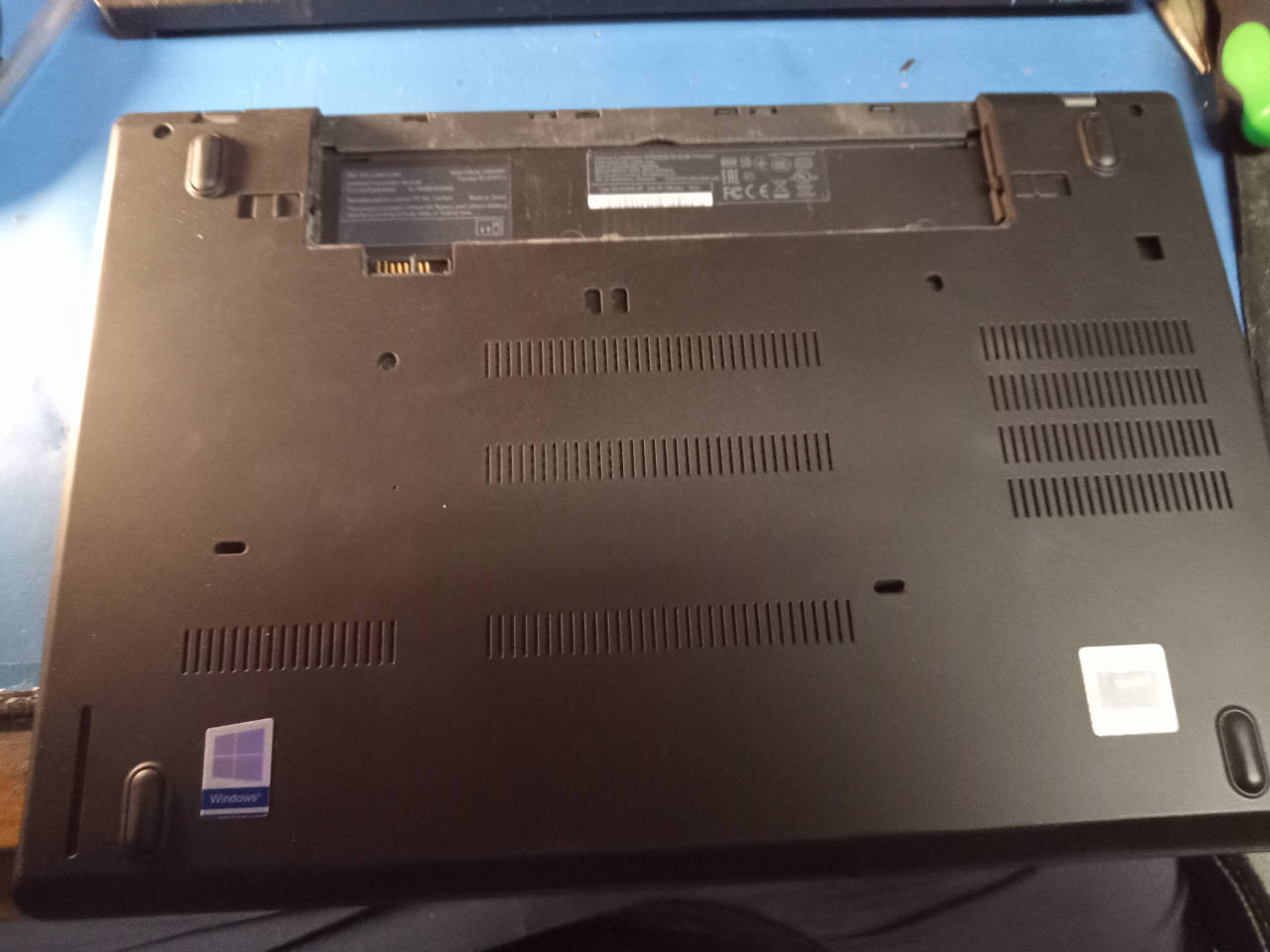
#### Disassemble the T480

Find videos online of how to disassemble this, and/or find Lenovo's own
service manual online. Otherwise, observe:

<img tabindex=1 alt="ThinkPad T480 underside chassis" class="p" src="https://av.libreboot.org/t480/t480bottom.jpg" /><span class="f"><img src="https://av.libreboot.org/t480/t480bottom.jpg" /></span>

Remove all screws, and you can gently pry off the lower chassis and remove,
which then allows you to see the inner motherboard:
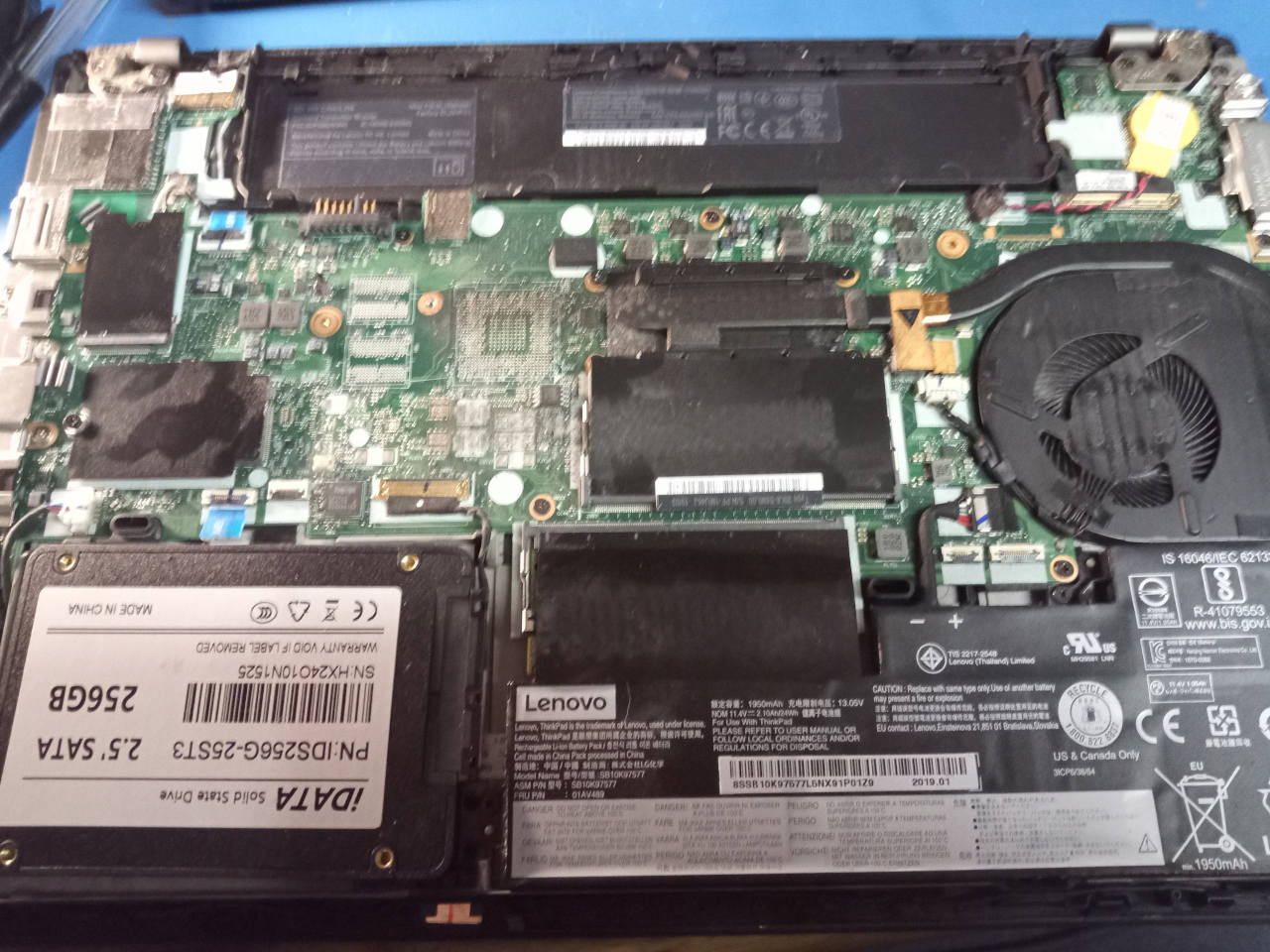
<img tabindex=1 alt="ThinkPad T480 PCB" class="p" src="https://av.libreboot.org/t480/t480pcb.jpg" /><span class="f"><img src="https://av.libreboot.org/t480/t480pcb.jpg" /></span>

**WARNING: PLEASE MAKE SURE to remove the battery before flashing. The T480
and T480s can both contain INTERNAL batteries, and the T480 has an additional
external battery. Remove the internal battery via the connector, like so (T480):**
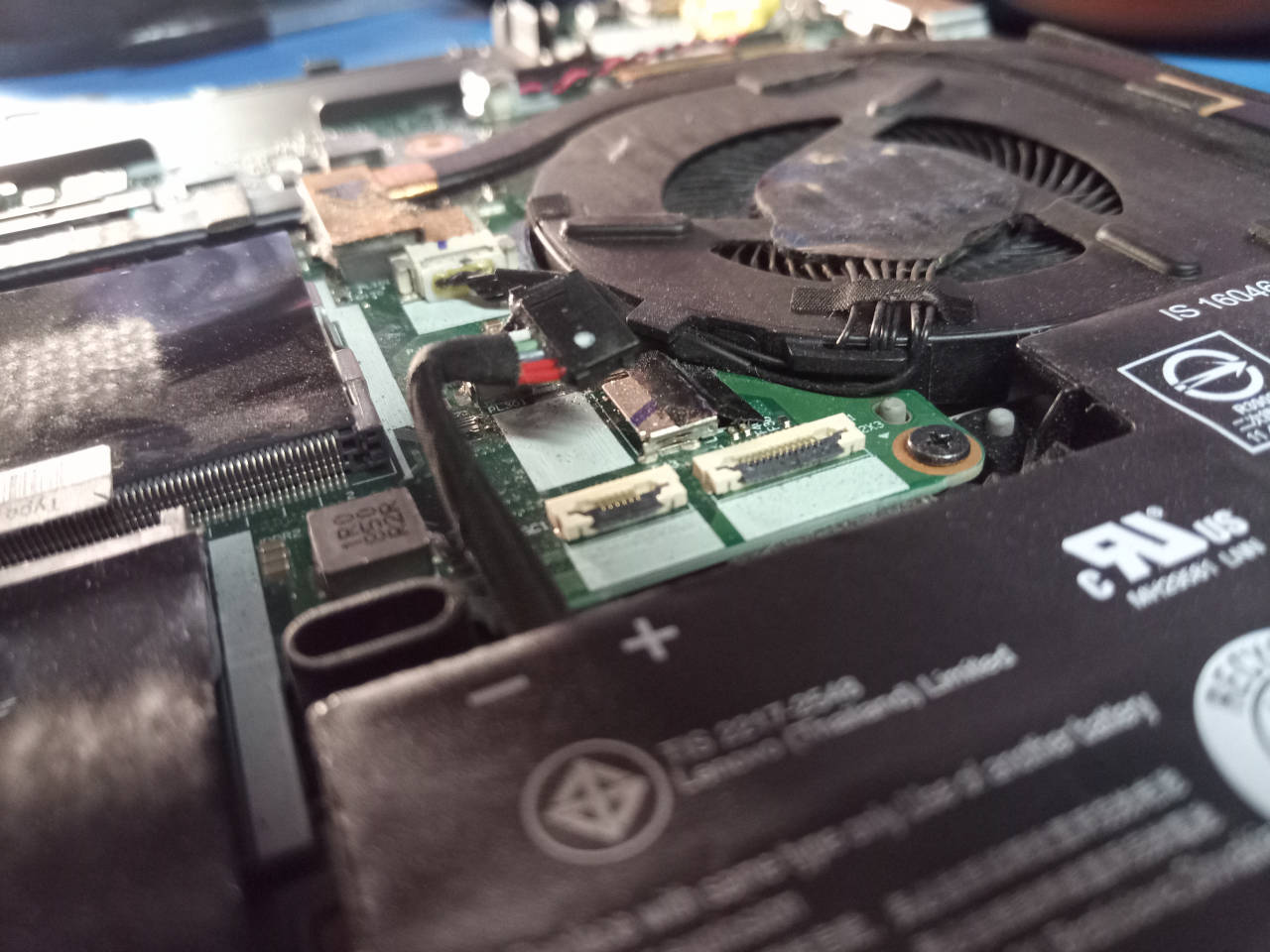
<img tabindex=1 alt="ThinkPad T480 internal battery" class="p" src="https://av.libreboot.org/t480/t480battery.jpg" /><span class="f"><img src="https://av.libreboot.org/t480/t480battery.jpg" /></span>

On the T480s (S model) the internal battery is much larger, and the connector
on it is built into the battery, so it is necessary to carefully remove the
entire battery; on regular T480 (non-S model) the internal battery can be
isolated via the connector as depicted above.

This photo shows the flash:
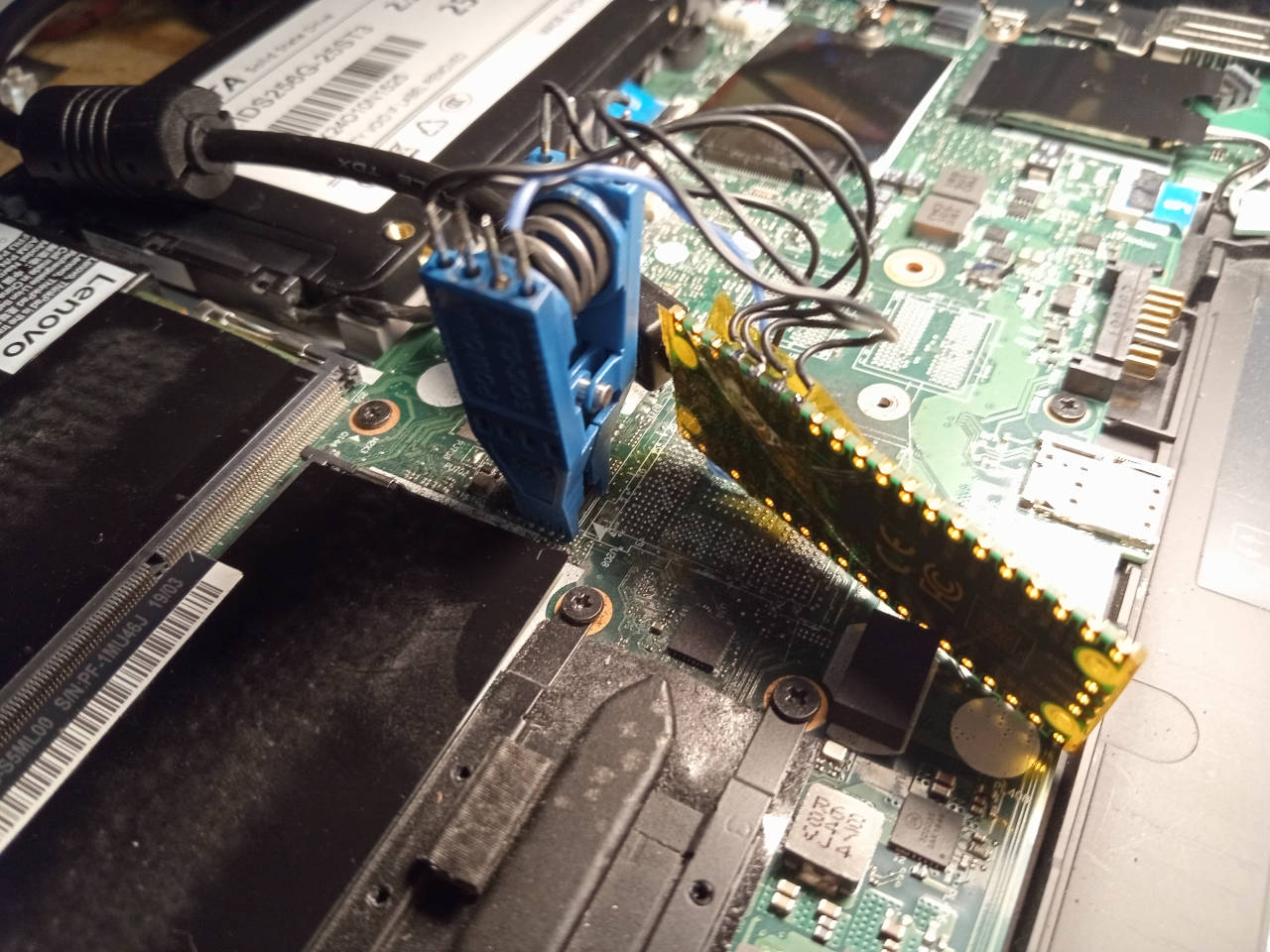
<img tabindex=1 alt="ThinkPad T480 NOR flash (system firmware)" class="p" src="https://av.libreboot.org/t480/t480spi.jpg" /><span class="f"><img src="https://av.libreboot.org/t480/t480spi.jpg" /></span>

There is another flash, for the Thunderbolt firmware, which you are to briefly
ignore; we'll cover it later:

<img tabindex=1 alt="ThinkPad T480 NOR flash (thunderbolt firmware)" class="p" src="https://av.libreboot.org/t480/t480tbspi.jpg" /><span class="f"><img src="https://av.libreboot.org/t480/t480tbspi.jpg" /></span>

To be clear: the system flash (16MB) is what you put Libreboot on. The
Thunderbolt firmware flash is much smaller, so you'll know because flashprog
will complain about wrong flash size if you're trying to flash the wrong one.

On the T480s (S model), the flashes are in slightly different places but in
both machines, the system flash (for Libreboot) is toward the centre, near
the memory.

Post-installation
-----------------

These next sections will tell you how to use certain hardware features, which
work a little bit differently due to idiosyncrasies of coreboot.

### Touchscreen on T480

The touchscreen was tested, and confirmed working. Not all models have it,
but it does indeed work perfectly on ones that do.

### UART (T480 and T580 only. Not T480S)

T580 is modified similarly to the T480, for UART output.

**You need to have first flashed the correct EC firmware version, as detailed
above.**

**NOT supported on the S model (T480s). Please only do it on a T480.**

The EC on ThinkPad T480 has a UART available, and it is enabled in coreboot,
as used by Libreboot. However, you must use a *specific* EC firmware version.
Please read notes elsewhere in this page regarding Lenovo UEFI/EC BIOS updates;
an exact version number is referenced, which you must install prior to Libreboot
installation.

Ways to flash the EC firmware from Libreboot have not yet been established. Now,
please observe the following photo:
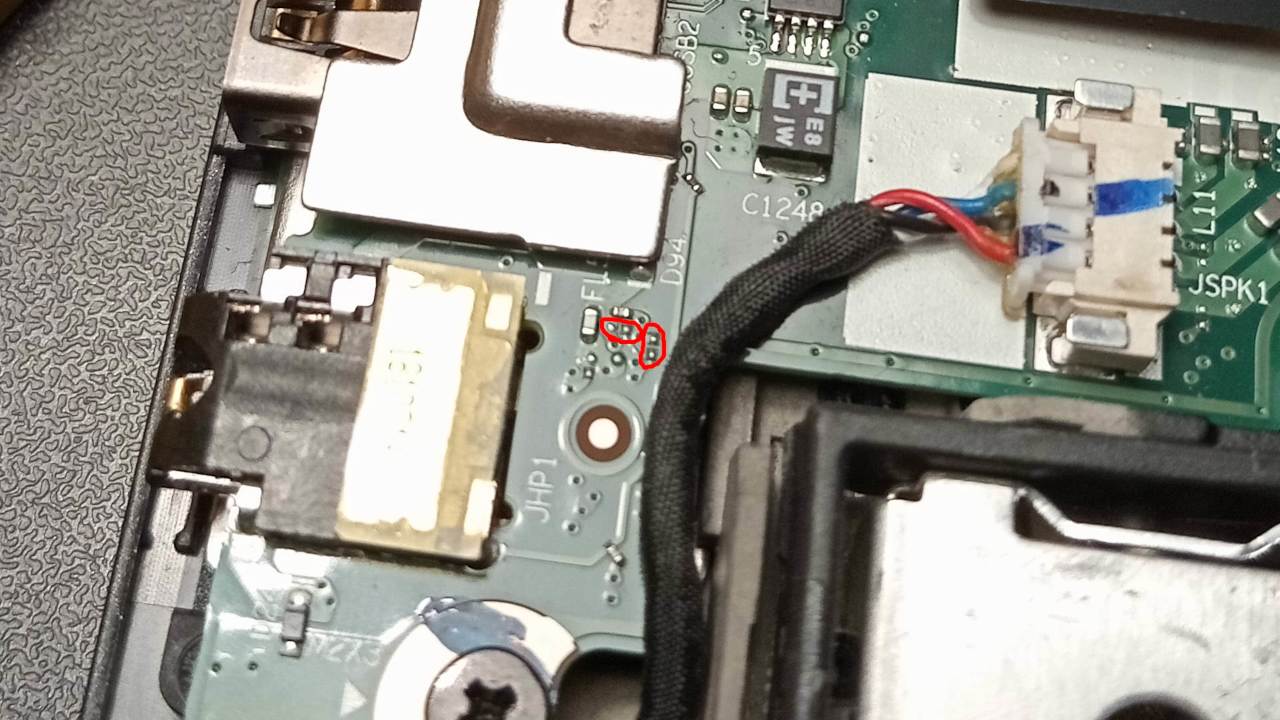
<img tabindex=1 alt="ThinkPad T480 UART jumpers" class="p" src="https://av.libreboot.org/t480/t480uart.jpg" /><span class="f"><img src="https://av.libreboot.org/t480/t480uart.jpg" /></span>

You will solder zero-ohm jumpers on the indicated footprints. These correspond
to TX and RX, which are connected to the R and L lines on the headphone jack,
respectively; a ground will also be available.

You must solder the zero-ohm jumpers, for UART to work. They are *0201* type
jumpers, which are extremely small. Please only do this if you have *excellent*
soldering skills because it's easy to goof this up if you're not careful.

You can hook this up to any 3.3v TTL UART dongle, to get a serial console. The
correct baud rate is 115200.

### Idea for 2nd NVMe mod

Interestingly, on boards without the Nvidia graphics, the solder pads for all
the componentry (including the GPU) is still present, so you could theoretically
design a QSB that solders to the right pads, and use it to wire a 2nd NVMe SSD;
the port is still enabled in Libreboot even if nothing is plugged into it, so it
should just work. (this doesn't actually exist yet, but it is electrically
possible, quite feasible to design/manufacture and already supported in the
Libreboot firmware in principle, since than PCI-E lane is enabled in the devicetree)

Mate Kukri came up with this idea. It's a great idea, so it's written here.
This mod is possible on both the T480 and T480s, though on T480s there would
be less clearance; using a smaller internal battery and having a makeshift
NVMe caddy in the remaining space would be how to go about it there. On the
regular T480, the existing caddy area could easily fit two NVMe drives.

Errata
------

Some features either don't work, or are untested, when running Libreboot on
the ThinkPad T480 or T480s.

### Microphone not working

Tested in Debian 12.9 with PulseAudio and OpenBSD 7.8 with sndio - the built-in 
microphone isn't detected at all. You can use an external USB microphone instead.

The aux (3.5 mm) audio output has been tested and confirmed working
on OpenBSD with sndio out of the box with no configuration needed
at all on the T480s (**S** variant only! T480 and T580 remain untested with OpenBSD). 
Note that similar attempts to make the aux work on other OSes have failed in the 
past so your experience may vary.

The good news is that the *webcam* seems to work just fine. All this will
need to be investigated.

### Power-on after power failure

Older Libreboot revisions made this machine always turn on, when plugging in
a power supply (charger brick), if a previous power loss was observed. This is
because coreboot sets a special register in the PMC that configures such
behaviour, but it was hardcoded to always-on. This is undesirable for most
people, so Libreboot 20241206 *revision 8* and newer releases contain the
following modification:

<https://browse.libreboot.org/lbmk.git/commit/?id=09a01477df67e3ddc36e11123c537332d7813c50>

If you wish to modify this behaviour again, you could modify the patch
referenced there; the actual location of the `.patch` file may change over
time, so you can basically just modify the coreboot source file
at `src/soc/intel/common/block/pmc/pmclib.c` (for the coreboot tree
under `src/coreboot/` in lbmk, pertaining to your board, which can be determined
by reading the `tree` variable in your board's `target.cfg` file within lbmk).

Use the patch as reference, to modify the coreboot behaviour as you wish, and
re-compile [from source](../build/).

### TPM disabled

The TPM is disabled on this device, to prevent hanging/boot delay in SeaBIOS,
due to buggy TPM drivers there.

### Legacy 8254 timer

Legacy 8254 timer enabled in coreboot, to prevent SeaBIOS from hanging.

### HyperThreading on T480/T480s/T580

Also called SMT. This is a feature where you get 2 threads on a single core.
It can improve performance in some workloads, but is actually a performance
liability in others, depending on your OS kernel/scheduler and the actual
workload.

It is a security liability, due to the Spectre/Meltdown attacks, so we
recommend turning it off, at the very least from your running operating system.
On *this* platform, you can easily turn it off from coreboot.

**Libreboot disables HyperThreading by default**, from Libreboot 20241206 rev8
onward, on this board. To turn it back on, please [build from source](../build/)
and before running the build command, do this:

	./mk -m coreboot t480_vfsp_16mb # replace t480 with t480s if needed

In the menu that appears, go *Chipset -> Enable Hyperthreading* and turn it on.
Then exit from the menu, saving the config where prompted. You will see this
menu twice, because there are *two* configs for each of these boards.

SMT is rarely of benefit in practice, but can be useful in some circumstances.
For example, if you're compiling a large codebase from source that takes hours,
SMT increases the building speed by about 15 percent; for example, a 3 hour
build job might take about 2 hours and 40 minutes instead.

### NFC support in T480

Some T480 models might have NFC support but  this is untested in Libreboot, and
probably doesn't work in current Libreboot releases.

The PCH's NFC device is unsupported in Linux anyway.

### Smartcard reader

The smartcard reader is enabled but it is still untested. If you have one,
please test it and report back to the Libreboot project.

### Thunderbolt STILL NEEDS TESTING

Thunderbolt support was added in Libreboot 26.01 RC1, but then removed before
the final 26.01 release. This was because it caused S3 resume to fail for some
users. More testing is needed. This was based on a patch from coreboot gerrit,
that was (at that time) not yet merged upstream.

### WWAN cards

B+M key NVMe SSDs in WWAN slot works, other cards are untested.

### thinkpad\_acpi issues {#thinkpad-acpi}

It has been reported that `thinkpad_acpi` does not load correctly on the T480.
This should also be the case for the T480s.

If you encounter this issue, check\
[this page](../../faq.md#thinkpad-acpi)
for details as to how to fix this.


[//]: # "SPDX-License-Identifier: GFDL-1.3-or-later"
